If you live in a multi-level home, choosing a robot vacuum for a multi-floor home is not only about suction or smart mapping. It also means thinking about stairs, carrying the robot, map memory, runtime, and where the dock will stay.
Marketing pages often use phrases like "multi-floor mapping" or "saves multiple maps" without explaining what that actually looks like day to day. This guide breaks down what multi-floor use generally involves, what tends to vary by model, and what to check in a product's documentation before you buy — without telling you which brand or model to choose.
Table of Contents
- Quick Answer: Can One Robot Vacuum Work in a Multi-Floor Home?
- What Multi-Floor Use Actually Means
- Multi-Floor Mapping and Map Memory
- Carrying the Robot Between Floors
- Docking, Charging, and Recharge/Resume Limits
- Runtime and Floor Size Matter More Than Beginners Expect
- Stairs, Cliff Sensors, and Thresholds
- What to Check Before Buying
- Common Mistakes Beginners Should Avoid
- Frequently Asked Questions
- Final Takeaway
Quick Answer: Can One Robot Vacuum Work in a Multi-Floor Home?
Often, yes — but it depends on your home's layout, how many floors you have, and how you want to manage docking and maps. Many robot vacuums can be used on more than one floor, especially models with a multi-map feature that lets them store and switch between saved maps. In most setups, this still means carrying the robot between levels yourself, since it cannot move between floors on its own. Whether one robot is the right fit for your specific home depends on details that vary by model, so it's worth checking a product's documentation rather than assuming.
What Multi-Floor Use Actually Means
It helps to separate two different ideas that "multi-floor" marketing language often blends together.
First, a robot vacuum cannot travel between floors by itself. It cannot climb or descend a staircase, so getting it from one level to another is a manual task — someone has to pick it up and carry it.
Second, some models add a software feature on top of this manual reality: multi-map support. This lets the robot's app remember more than one floor's layout, so you don't have to start mapping from scratch every time you move the robot to a different level. This is a named, model-dependent feature, not something every robot vacuum includes.
In other words, "multi-floor" robot vacuum use is really a combination of a physical step (carrying the robot) and, on supported models, a software convenience (saved maps for each floor). Understanding both halves makes it easier to know what you're actually getting before you buy.
Multi-Floor Mapping and Map Memory
Multi-floor or multi-map support generally means the robot's app can save and manage more than one floor's map, rather than overwriting the previous map every time the robot is used somewhere new. If you'd like a closer look at how robot vacuum mapping works in general, that's covered in our separate guide on how robot vacuum mapping works.
To create a usable map for an additional floor, the general approach is to carry the robot to that floor and let it run a cleaning or mapping pass there, depending on the model. This is consistent with how mapping is built in general — the robot needs to physically be on a floor to map it.
Saved Maps May Vary by Model
The number of maps a model can store varies by brand and model, and can also depend on the app version. Rather than assuming a specific number, it's worth checking your model's own documentation or app for its actual map limit before relying on it for a multi-floor setup.
If your current basic model doesn't reliably hold a separate map per floor, see our comparison of what changes if you upgrade to a LiDAR model.
Floor Recognition May Not Always Be Automatic
Whether the robot automatically recognizes which floor it's on, and loads the matching saved map, can vary by model. On some models this happens automatically; on others, you may need to manually select the correct floor or map in the app after carrying the robot upstairs or downstairs. Neither behavior should be assumed without checking your specific model.
Carrying the Robot Between Floors
In most multi-floor setups, using one robot vacuum across more than one level means physically carrying it between floors. This is a normal, expected part of multi-floor use rather than something to be alarmed about — it's simply how the robot gets from one level to another, since it cannot climb stairs on its own.
If your home has more than one floor you'd like cleaned, it's worth thinking through how often you're realistically willing to carry the robot, and whether that fits your routine, before assuming multi-floor use will feel effortless.
Docking, Charging, and Recharge/Resume Limits
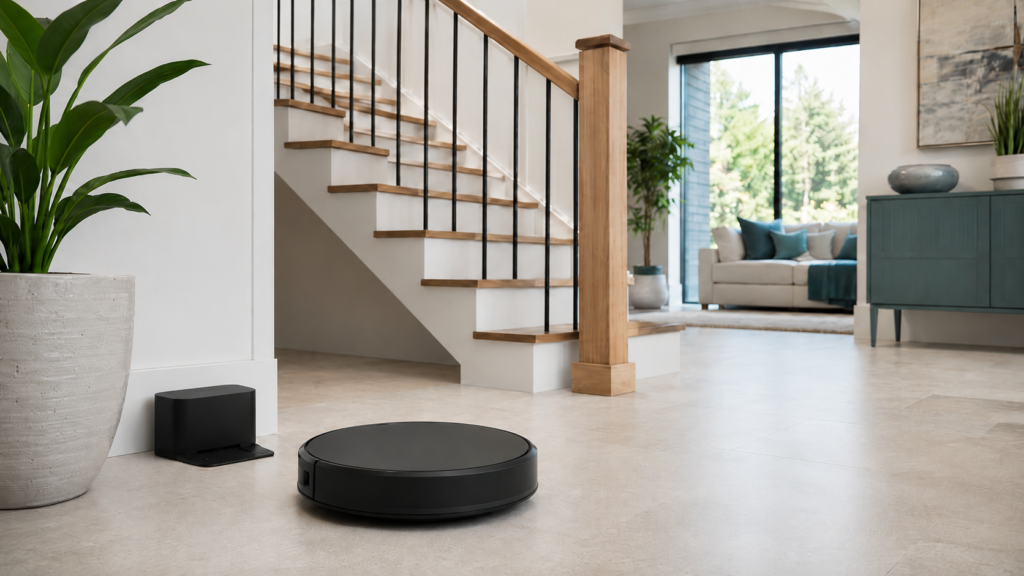
A charging dock physically lives on one floor. This is one of the more overlooked parts of multi-floor use, because it affects what happens when the robot finishes cleaning or runs low on battery.
Manufacturers generally suggest against moving the one charging dock back and forth between floors as a daily routine — repeatedly disconnecting and relocating a dock isn't the intended way to use it. If you'd like a dock available on more than one floor, our guide on where to place a robot vacuum charging dock covers general placement basics that also apply if you add a second dock.
When the Dock Is Only on One Floor
If there's no dock on the floor you're cleaning, many robots will simply stop and wait in place to be retrieved, rather than attempting to find a dock somewhere else in the house. Some brands sell an additional charging dock separately for households that want one on each floor, but this is optional — not a strict requirement. Whether it's worth it depends on how often you plan to use the robot on that floor.
Why Moving the Dock Can Cause Problems
It's also worth knowing that moving the robot or its dock during or shortly after a mapping session can disrupt or invalidate the map that was just created. If a map seems to disappear or behave oddly after moving things around, this is a common, repeatable cause worth checking before assuming something is broken.
Runtime and Floor Size Matter More Than Beginners Expect
When a robot is cleaning a floor that doesn't have a dock nearby, runtime becomes more important than it would be in a single-floor home. The robot needs enough battery to get through that floor's cleaning run, since it generally can't recharge there. For a fuller look at what affects runtime in general, our guide to robot vacuum battery life covers the basics that also apply here.
Battery life and effective coverage can vary by model and by the size and layout of the floor being cleaned. Rather than assuming any specific runtime number, it's worth checking your model's documentation and comparing it to the approximate size of the floor you plan to clean without dock access.
Stairs, Cliff Sensors, and Thresholds
Stairs deserve their own section, since they're directly tied to how multi-floor homes are laid out.
Robot Vacuums Cannot Climb Stairs
Robot vacuums generally cannot climb stairs. This is a category-wide limitation, not something specific to one brand, and it's the main reason carrying the robot between floors is the normal approach to multi-floor use.
Cliff Sensors Help, But They Are Not a Guarantee
Cliff sensors are a standard safety feature designed to help the robot detect drop-offs, such as the edge of a staircase, and avoid driving over them. They're a helpful safeguard, but they shouldn't be treated as an absolute guarantee against every possible scenario. Keep cliff sensors clean and unobstructed, and never disable or bypass them — if a robot seems to be behaving oddly near a stairway, follow the manufacturer's guidance rather than experimenting near the edge.
Thresholds and Floor Transitions Can Still Matter
Thresholds and small floor-level changes are a related but separate consideration from multi-floor mapping and docking. If you're curious about how different floor types and transitions affect a robot vacuum more broadly, that's a topic covered in its own right elsewhere on the site rather than something this guide tries to fully re-explain.
What to Check Before Buying
Once you understand the general concepts above, the practical next step is checking a specific model's documentation rather than assuming any of these behaviors apply universally.
Multi-Map Support
Confirm whether the model you're considering supports multiple saved maps at all, and if so, how many. This single detail affects how convenient multi-floor use will feel day to day.
Dock and Charging Expectations
Check what the manufacturer says happens if the robot can't find a dock on the floor it's cleaning, and whether an additional dock is available separately if you want one on more than one level.
Runtime for Each Floor
Compare the model's stated runtime to the approximate size of each floor you plan to clean, especially any floor that won't have a dock nearby.
Manual and App Guidance
Review the model's manual or app help center directly for floor-recognition behavior and recharge/resume guidance, rather than relying on general assumptions. These details are genuinely model-specific, and checking them before buying can prevent surprises later.
Common Mistakes Beginners Should Avoid
A few assumptions are easy to make but worth double-checking before you buy:
- Assuming every robot vacuum supports multi-floor mapping, when this is actually a model-dependent feature.
- Assuming the robot will find its way back to a dock that's on a different floor than the one it's cleaning.
- Assuming one robot vacuum is automatically "enough" for your home without checking how its specific features match your layout.
- Assuming cliff sensors make stair placement completely risk-free, rather than treating them as a helpful but non-absolute safeguard.
Frequently Asked Questions
Can one robot vacuum clean multiple floors?
Often yes, especially with models that support multiple saved maps, but it generally still means carrying the robot between levels and depends on your home's layout and docking setup.
Do robot vacuums climb stairs?
No. Robot vacuums generally cannot climb stairs, which is why carrying the robot between floors is the standard approach to multi-floor use.
Do all robot vacuums have multi-floor mapping?
No. Multi-floor or multi-map support is a feature that varies by model — it's not included on every robot vacuum, so it's worth confirming before you buy.
Can a robot vacuum clean a floor without the dock on the same floor?
Often, yes, if it has enough charge to finish the job. Without a dock on that floor, though, it will typically just stop and wait once it's done or low on battery, rather than finding another way to recharge.
Do cliff sensors always prevent falls?
No. Cliff sensors are designed to help detect drop-offs like stair edges, but they're a safety aid, not an absolute guarantee.
Is a second dock necessary for a multi-floor home?
Not necessarily. Some brands sell an additional dock separately for convenience, but it's optional rather than a strict requirement.
What should buyers check before choosing a robot vacuum for a multi-floor home?
Check the model's documentation for multi-map support, how it handles docking and recharge/resume when no dock is present, expected runtime relative to your floor sizes, and any app-specific guidance on managing multiple floors.
Final Takeaway
Using a robot vacuum across more than one floor is generally possible, but it works differently than "multi-floor" marketing language might suggest. It usually still involves carrying the robot between levels, and details like map limits, dock requirements, and runtime can vary significantly by model. Rather than assuming one robot will automatically fit your multi-floor home, the most reliable approach is checking the specific model's own documentation against your home's layout. If you're still researching the basics of choosing a robot vacuum in general, our broader robot vacuum buying guide for beginners is a good place to start before narrowing things down to your multi-floor situation.