If you are comparing a robot vacuum auto-empty dock with a standard charging dock, it helps to understand what the dock actually changes —and what it does not change. Many product pages describe this feature as a way to "skip emptying for weeks," which is true in a limited sense, but it doesn't tell the whole story. This guide walks through what an auto-empty dock does, what it doesn't do, what tends to vary between models, and what to check before deciding whether the extra cost and space make sense for your home.
This is not a buying recommendation for any specific brand or model. It's a plain explanation of the trade-offs, so you can ask better questions when you're comparing options. If you're still working through the basics of choosing a robot vacuum in general, our broader robot vacuum buying guide is a good place to start before narrowing in on a specific feature like this one.
Table of Contents
- Quick Answer: What a Robot Vacuum Auto-Empty Dock Changes
- What an Auto-Empty Dock Actually Does
- What an Auto-Empty Dock Does Not Do
- Space and Dock Placement Still Matter
- Dust Bags, Bins, Filters, and Airflow Paths
- Maintenance Still Does Not Disappear
- Features That May Vary by Model
- What to Check Before Buying
- Common Mistakes Beginners Should Avoid
- Frequently Asked Questions
- Final Takeaway
Quick Answer: What a Robot Vacuum Auto-Empty Dock Changes
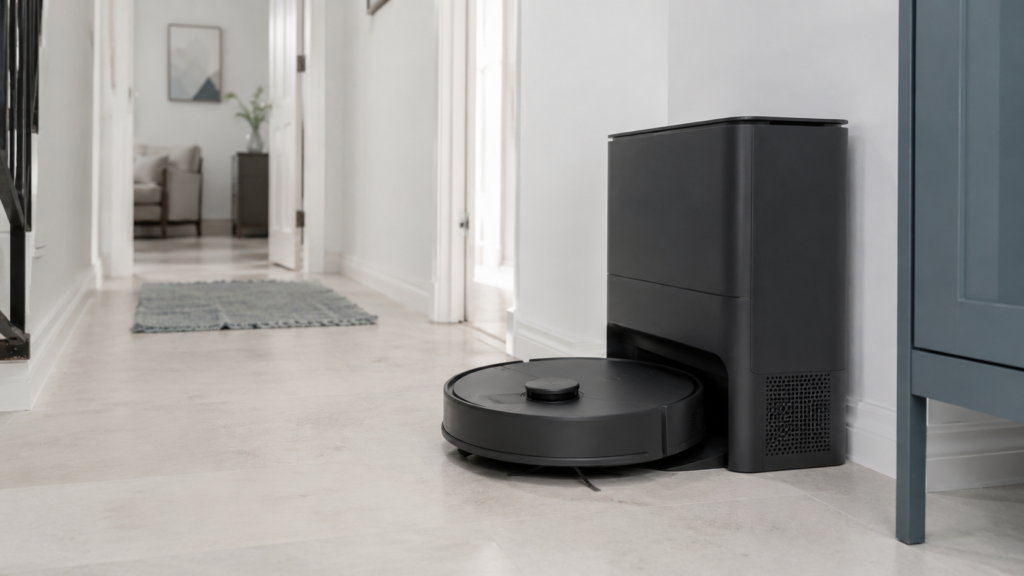
An auto-empty dock automatically transfers debris from the robot's onboard dustbin into a larger container or bag at the dock after each cleaning run. That means you empty the robot itself far less often. It does not mean maintenance disappears: filters, brushes, charging contacts, and the dock's own dust path still need occasional attention, and the exact details depend on the model.
What an Auto-Empty Dock Actually Does
At a basic level, an auto-empty dock works like this: when the robot finishes cleaning (or sometimes during a cleaning run), it returns to the dock, and the dock pulls debris out of the robot's small onboard dustbin into a much larger container or disposable bag built into the dock itself. Because the dock's container is bigger than the robot's own bin, you don't have to empty it nearly as often —some setups are designed to go weeks between dock-level emptying, depending on usage and household size.
The exact mechanism varies by design. Some docks use a disposable bag that you eventually remove and replace. Others use a different collection approach. Either way, the core idea is the same: less frequent manual emptying of the robot's own bin, handled automatically through the dock.
What an Auto-Empty Dock Does Not Do
This is the part that's easy to miss when a feature is marketed as a convenience upgrade. An auto-empty dock does not remove all maintenance, and it does not guarantee better cleaning performance on its own.
Specifically, it generally does not:
- Eliminate the need to occasionally clean filters, brushes, or charging contacts
- Guarantee that the robot will clean more thoroughly or pick up more debris
- Prevent every kind of clog or blockage
- Remove the need to occasionally check the dock itself for buildup
In other words, an auto-empty dock changes how often you handle the robot's dustbin —it doesn't take maintenance off the table entirely. Depending on the model, you may still need to clean or replace filters, brushes, and contacts, and you may still need to check the station periodically to make sure everything is working as expected.
| What It Does | What It Does Not Do |
|---|---|
| Transfers debris from the robot's bin into a larger dock container | Eliminate the need to clean filters, brushes, or contacts |
| Reduces how often you empty the robot's own small bin | Guarantee more thorough cleaning or debris pickup |
| Can go weeks between emptying, depending on usage | Remove the need to occasionally check the dock itself |
Space and Dock Placement Still Matter
Auto-empty docks are still docks —the robot needs to be able to reach them reliably, and the station itself needs room to operate. Some manufacturers specify a minimum clear space in front of or around the dock so the robot can enter and exit without obstruction, and so the dock's internal mechanism has room to work. The exact distance isn't the same across every manufacturer, so it's worth checking your specific model's manual or product page for the recommended clearance rather than assuming a fixed number.
Placement also affects reliability in general —a dock tucked into a tight corner or surrounded by furniture can cause the same kind of docking problems you'd see with a standard charging dock. The same general thinking behind where to place a robot vacuum charging dock applies here, just with an extra layer of complexity if the auto-empty mechanism also needs its own clearance to function.
Dust Bags, Bins, Filters, and Airflow Paths
Auto-emptying depends on more than just the robot and the dock talking to each other. A few physical components are usually involved, and each one can affect whether the feature works smoothly.
Dust Bags and Larger Containers
Some auto-empty docks collect debris in a disposable bag that you remove and replace once it's full. Others use a different kind of container. Which one a given model uses affects how "hands-off" the maintenance really is —bags are typically a quick swap, while other designs may involve a bit more cleaning. Neither approach is universally better; it depends on what trade-off you'd rather make.
Filters and Dust Paths
Separately from the dock's collection system, the robot's own filter usually still needs periodic cleaning or replacement, and the path debris travels through (both inside the robot and inside the dock) needs to stay relatively clear. An auto-empty dock doesn't change this —it just changes where the bulk of the dust ends up.
Closed Covers and Correct Installation
Several manufacturers note that auto-emptying depends on things being installed correctly: covers and doors fully closed, the bag or bin properly seated, and the air path unobstructed. If an auto-empty cycle doesn't seem to be working, checking these basics first is usually more useful than assuming something is broken —the same safe beginner troubleshooting checks used for general stalls or stoppages are a reasonable starting point here too.
Maintenance Still Does Not Disappear
It's worth repeating, because it's the most common misconception: an auto-empty dock reduces one specific task (emptying the robot's small onboard bin) without eliminating maintenance as a whole. Charging contacts may need an occasional wipe-down. Brushes can still tangle with hair or debris. Filters still age and need cleaning or replacement on some schedule, even if that schedule varies by manufacturer —the general process for cleaning a robot vacuum dustbin and filter generally still applies, even though auto-emptying handles most of the dustbin transfer for you.
As a general safety habit, many manufacturers recommend turning the robot and dock off, or unplugging the dock, before doing any direct cleaning or maintenance —check your model's manual for the specific steps, since this can vary. If a problem continues after basic checks like clearing visible obstructions or wiping down contacts, contacting the manufacturer or an authorized service provider is generally the safer next step rather than attempting a deeper repair yourself.
Features That May Vary by Model
"Auto-empty dock" isn't one single standardized feature —it's closer to a category that covers a range of designs, some basic and some considerably more advanced.
Basic Auto-Empty Docks
The simplest version just handles dust: the robot's onboard bin gets emptied into a larger container or bag at the dock, and that's the extent of what the station does.
Stations With Extra Mop or Water Features
Some stations go further, adding water refill, mop pad washing, or even drainage systems that connect to your home's plumbing. These are genuinely separate features layered on top of basic auto-emptying, not something every auto-empty dock includes. If you're considering one of these more advanced stations, it's worth understanding that installation can be more involved —sometimes significantly so —than a basic dock that just plugs into an outlet.
Bagged and Bagless Designs
As mentioned earlier, some docks use a disposable bag and others don't. This is a model-specific design choice rather than an industry standard, so it's a detail worth confirming for any specific unit you're considering rather than assuming one design is universal.
What to Check Before Buying
Rather than asking "is an auto-empty dock good," it's more useful to ask a few specific questions based on your own space and habits.
Dock Size and Placement Needs
Does your space have a spot where the dock can sit with enough clearance, based on what the manufacturer recommends? Auto-empty docks are generally larger than standard charging docks, so this is worth checking before you buy, not after.
Bag or Bin Maintenance
What does the manufacturer say about how often the bag or bin needs attention, and how easy that process is? This varies enough between models that it's worth reading the specific product's documentation rather than assuming.
Noise During Emptying
The auto-empty cycle can produce a brief sound when debris transfers from the robot into the dock. If noise is a concern —for example, if the dock will be near a bedroom or a shared wall —it's reasonable to look for any information the manufacturer provides about this before buying, since this isn't something that's consistent across every model.
Manual and Support Requirements
Before buying, it's worth checking whether the manufacturer's manual or support page clearly explains maintenance steps, clearance requirements, and basic troubleshooting. A model with clear, accessible documentation tends to be easier to live with day-to-day, regardless of brand.
Common Mistakes Beginners Should Avoid
A few patterns come up often enough to call out directly:
- Assuming an auto-empty dock means no more maintenance at all
- Not measuring or planning for the dock's clearance needs before buying
- Not checking whether mop washing, water refill, or drainage features are included or separate
- Skipping the manual entirely and relying only on marketing descriptions
- Attempting to repair a damaged power cord, plug, or battery yourself instead of contacting the manufacturer or an authorized service provider
- Improvising plumbing connections for a plumbed station instead of following the manufacturer's installation instructions
Frequently Asked Questions
Does an auto-empty dock remove all maintenance? No. It reduces how often you manually empty the robot's onboard dustbin, but filters, brushes, contacts, and the dock itself can still need periodic attention depending on the model.
Does every auto-empty dock use a disposable bag? No. Some use a bag-based design, while others use a different collection approach. This varies by model, so it's worth checking the specific unit you're considering.
Is an auto-empty dock loud? The emptying cycle can produce a brief sound when debris transfers into the dock. Exact noise levels aren't consistent across every model, so check manufacturer information if this matters to you.
Does an auto-empty dock need special placement? Generally yes —clear space around the dock can matter for both docking and for the auto-empty mechanism to work. Manufacturers vary in their specific clearance recommendations, so check your model's manual.
Do all auto-empty docks include mop washing or water refill? No. Those are separate, more advanced features found on some stations, not a standard part of basic auto-emptying.
Should I check the manual before buying a model with this feature? Yes. Manuals typically cover clearance, maintenance schedules, and troubleshooting steps that vary by model and aren't always obvious from a product listing.
What should I check if the dock doesn't seem to be emptying properly? Start with the basics: make sure covers and doors are fully closed, the bag or bin is properly installed, and the air path isn't blocked. If the issue continues after that, the manufacturer's manual or support contact is the next step.
Is an auto-empty dock worth it? That depends on your own priorities —how much you value not emptying the robot manually, how much space you have, and how much you're willing to spend. It's a genuine convenience trade-off rather than something that's automatically worth it for every home.
Final Takeaway
An auto-empty dock is a real convenience feature, not a maintenance-free upgrade. It meaningfully reduces how often you empty the robot's own dustbin, but filters, brushes, contacts, and the dock itself still need occasional attention, and the specifics —clearance needs, bag versus other designs, noise, and whether extra features like mop washing are included —vary by model. Checking the manufacturer's manual or support page for your specific model before buying is the most reliable way to know what you're actually getting.