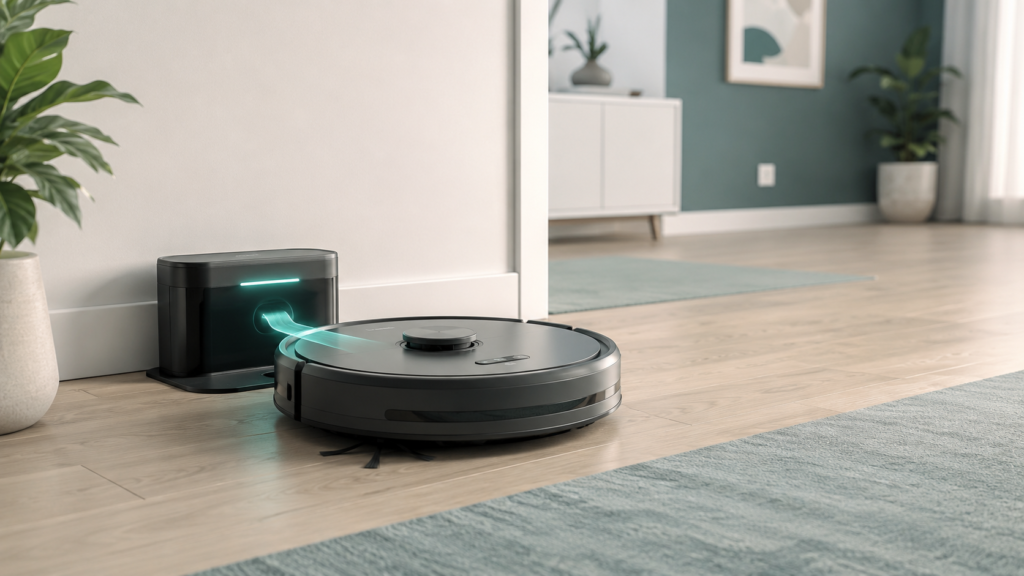
If your robot vacuum keeps missing its dock, wandering past it, or running low on battery before it gets home, the problem is often as simple as where the dock is placed. Most robot vacuums rely on a clear, open path and a stable signal to find their way back, so a dock tucked into a busy corner or surrounded by clutter can quietly cause problems that have nothing to do with the robot itself.
This guide walks through where to place a robot vacuum charging dock, what setup mistakes to avoid, and why exact clearance guidance can vary from one model to the next. It is written for beginners who just unboxed a new robot vacuum, or who are troubleshooting a docking problem after moving the dock or rearranging a room.
Table of Contents
- Quick Answer
- Why Charging Dock Placement Matters
- Start With a Flat, Stable Surface
- Place the Dock Against a Wall When Possible
- Leave Open Space Around the Dock, but Check Your Manual
- Keep the Dock Plugged In and Easy to Reach
- Avoid Clutter, Cords, and Loose Objects Near the Dock
- Think Carefully About Stairs, Rugs, and Narrow Areas
- Placement Factors at a Glance
- Can You Put a Robot Vacuum Dock Under Furniture?
- What About Self-Empty or Mop Docks?
- Common Charging Dock Placement Mistakes
- Beginner Checklist Before You Choose a Dock Location
- FAQ
- Final Takeaway
Quick Answer
Place the charging dock on a flat, hard surface, against a wall if possible, with open space around it and no cords, clutter, or rugs in the way. Keep it plugged in at all times and away from stairs. Exact clearance distances vary by brand and model, so always check your own manual for specifics — this guide explains the general setup logic behind that guidance.
Why Charging Dock Placement Matters
A robot vacuum’s charging dock is the fixed point the robot uses to recharge between cleaning sessions, and on many models, it is also a reference point the robot relies on when finding its way home. If the dock is hard to reach, hidden, or surrounded by obstacles, the robot may take longer to dock, miss it entirely, or stop short of a full recharge.
Most docking problems are not caused by a broken robot — they are caused by a setup detail that can be adjusted in a few minutes, like moving a cord out of the way or shifting the dock a few inches from a wall corner. A clear, open route also matters for how the robot finds its way around the room in general, since the same sensors and signals a robot uses to clean a space often help it return to base as well.
Start With a Flat, Stable Surface
The surface under the dock matters more than many beginners expect. A dock that sits unevenly, rocks slightly, or rests on a soft surface can shift out of position over time, which changes the exact spot the robot is aiming for.
Manufacturer setup guides commonly recommend a hard, level floor surface for the dock rather than a rug or carpet. A hard surface keeps the dock from tilting, sliding, or sinking slightly into soft flooring, all of which can throw off the robot’s approach.
If your home is mostly carpeted, look for a small hard-floor area near an entryway, hallway, or kitchen edge where the dock can sit flat and stable.
Place the Dock Against a Wall When Possible
Placing the dock flat against a wall is one of the most consistent recommendations across manufacturer setup instructions. A wall gives the dock a stable backstop, helps keep it out of high-traffic walking paths, and gives the robot a predictable angle to approach from.
This does not mean the dock has to go in a corner or be squeezed between furniture. A flat, open stretch of wall — even a short one — usually works better than a tight corner, since corners often come with less clearance on the sides.
Leave Open Space Around the Dock, but Check Your Manual
Open space around the dock is one of the most commonly repeated pieces of setup advice: furniture, baskets, or shoe racks placed too close can block the robot’s approach path or interfere with the signal it uses to locate the base.
Exactly how much space is recommended differs by brand and even by dock model — some manufacturer support pages describe somewhat tighter clearance than others, and dock types with extra components, like an attached dustbin-emptying unit, sometimes call for additional room. Because these figures are not consistent across brands, this guide intentionally avoids stating one universal number.
The safest approach is simple: keep the area on both sides and in front of the dock visibly open and furniture-free, then check your specific model’s manual for the exact clearance it recommends, rather than a number from an unrelated brand or article.
Keep the Dock Plugged In and Easy to Reach
A charging dock only works if it stays connected to power. Many beginners unplug the dock temporarily — to vacuum behind it or clean during a home project — and forget to plug it back in. If the dock loses power, the robot may return to the correct spot but fail to charge, which can look like a docking problem even though placement was never the issue.
It also helps to think about reachability, not just clearance. The robot needs an unobstructed route to the dock from the areas it normally cleans, since battery runtime and how it relates to a robot’s cleaning behavior only matters if the robot can actually get back to recharge. This guide does not cover runtime or charging behavior in detail — that is covered separately — but the basic setup point stands: an accessible, powered dock is part of reliable everyday use.
Avoid Clutter, Cords, and Loose Objects Near the Dock
Cords, shoes, pet toys, and small objects near the dock are a common, easy-to-miss cause of docking trouble. A robot approaching its dock typically needs a clean, predictable path, and a stray cord or object in that path can block the approach, get caught in the robot’s wheels or brushes, or confuse its sensors.
Keeping the dock’s own power cord tidy is worth a little extra care, too. Basic cord-safety habits matter for any plugged-in device: avoid running the cord under a rug, avoid overloading a shared power strip, and use a cord rated for continuous use rather than occasional, short-term use.
A quick weekly glance at the area around the dock for anything that has drifted into the space is a simple habit that prevents most clutter-related docking issues.
Think Carefully About Stairs, Rugs, and Narrow Areas
A few specific locations are worth avoiding even if they otherwise seem convenient. Placing the dock directly next to a staircase or a steep drop-off is generally discouraged, since it puts the robot close to a fall risk every time it docks or undocks. Closets and other tight, enclosed spaces are also commonly discouraged, mainly because they rarely offer enough open space on the sides or in front of the dock.
Rugs and carpet directly under the dock are best avoided for the same reasons covered earlier — a soft, uneven surface can shift the dock’s exact position over time. Narrow hallways can work in some homes, but only if there is still enough width for the robot to approach and turn without scraping nearby walls or furniture.
Placement Factors at a Glance
| Placement factor | Why it matters | What to check |
|---|---|---|
| Surface | A hard, level surface keeps the dock stable and in the same spot over time | Is the floor under the dock hard and flat, not a rug or carpet? |
| Wall position | Wall placement gives the dock a stable backstop and a predictable approach angle | Is the dock flat against a wall rather than freestanding in open space? |
| Open space | Furniture or clutter nearby can block the robot’s approach or signal | Is the area on the sides and in front of the dock visibly open? |
| Power outlet | The dock only works if it stays connected to power | Is the dock plugged into a reliable outlet that won’t be switched off? |
| Cords and clutter | Loose cords and objects can interfere with the approach path | Are cords tucked away and the immediate area free of small objects? |
| Stairs or edges | Docking near a drop-off adds unnecessary fall risk | Is the dock located well away from stairs or steep edges? |
| Dock type | Larger dock types may need more room than a basic charging dock | Does your model’s manual mention any extra space needs for your dock type? |
Can You Put a Robot Vacuum Dock Under Furniture?
Tucking the dock under a table, shelf, or open cabinet is a common instinct for beginners who want it out of sight, but this is usually not recommended. Furniture overhead can block the robot’s approach angle, narrow the available clearance, or interfere with the signal the robot uses to find the dock.
If keeping the dock visually out of the way matters to you, look for an open stretch of wall in a less central spot — like the end of a hallway or a quiet corner with a flat approach — rather than hiding it underneath something. A dock that is easy for the robot to reach is generally more useful than one that is easy to hide.
What About Self-Empty or Mop Docks?
Some robot vacuums use larger dock types that also empty the dustbin automatically, refill a mop tank, or wash a mop pad. These docks are physically bigger and sometimes have extra components, like a water reservoir, attached to the base.
Because these dock types are larger, they often need more surrounding space than a basic charging-only dock. The placement basics in this guide still apply — flat surface, wall position, open space, away from stairs and clutter — but it is especially worth checking your model’s manual, since extra components can change the footprint needed.
Common Charging Dock Placement Mistakes
A few placement mistakes come up again and again, and most are easy to fix once spotted:
- Placing the dock on a rug or carpet instead of a hard, flat surface.
- Tucking the dock into a closet or tight enclosed space with little clearance.
- Leaving cords, shoes, or small objects in the robot’s approach path.
- Placing the dock close to a staircase or steep edge.
- Unplugging the dock temporarily and forgetting to reconnect it.
- Choosing a spot that looked tidy on setup day but became cluttered with everyday use over time.
- Assuming one universal clearance number applies to every brand and dock type.
Beginner Checklist Before You Choose a Dock Location
Use this short checklist when setting up a new dock or troubleshooting an existing one:
- Is the dock on a flat, stable surface rather than a rug or carpet?
- Is the dock placed against a wall, or otherwise in a stable, predictable spot?
- Is the area on the sides and in front of the dock visibly open?
- Is the dock plugged into a reliable outlet that stays powered?
- Are cords and small objects kept out of the robot’s path to the dock?
- Is the dock located away from stairs or steep edges?
- Does the spot match what your own model’s manual recommends, rather than a number from somewhere else?
- Can the robot realistically reach this spot from the areas it normally cleans?
FAQ
Can I put a robot vacuum dock under furniture?
Usually better not to. Furniture overhead can block the approach angle and reduce open space. An open stretch of wall is generally a better choice than tucking the dock underneath something.
Should a robot vacuum charging dock be against a wall?
Yes, this is a common recommendation across manufacturer setup guides. A wall gives the dock a stable backstop and predictable approach angle, though the spot still needs open space on the sides and in front.
How much space does a robot vacuum dock need?
This varies by brand and dock type, so there is no single universal number. Keep a visibly open area on both sides and in front of the dock, then check your model’s manual for the specific distance it recommends.
Can a robot vacuum dock be near stairs?
Generally better to avoid placing the dock directly next to stairs or a steep drop-off, since this adds an unnecessary fall risk each time the robot docks or undocks.
Can I move the charging dock after setup?
Yes. Some models may need a little time, or a fresh mapping run, to adjust to a new location, but moving the dock occasionally is a normal part of rearranging a room.
Why does my robot vacuum miss the dock?
Often related to placement rather than a hardware problem — common causes include clutter in the approach path, insufficient open space, or a dock that has shifted on an uneven surface.
Should the charging dock stay plugged in?
Yes, generally. Keeping the dock connected to power lets the robot return and recharge automatically between cleaning sessions.
Do self-empty docks need more space?
Often, yes. Self-empty, mop-refill, or mop-wash docks are physically larger and may have extra components, so check your specific model’s manual for guidance on your dock type.
Final Takeaway
Good charging dock placement is a small setup detail that can prevent a surprising number of everyday docking problems. A flat, stable surface, a spot against a wall, open space around the dock, and a clutter-free approach path cover most of what matters for most homes. From there, the most reliable next step is your own manual, since exact clearance and space requirements can differ by brand and dock type. Pairing this guide’s general setup logic with your model’s specific instructions — and a broader sense of what to consider before buying a robot vacuum in the first place if you’re still early in the process — gives you a solid, low-effort foundation for reliable, everyday docking.